> ## Documentation Index
> Fetch the complete documentation index at: https://docs.wpos.ai/llms.txt
> Use this file to discover all available pages before exploring further.
# Elementor
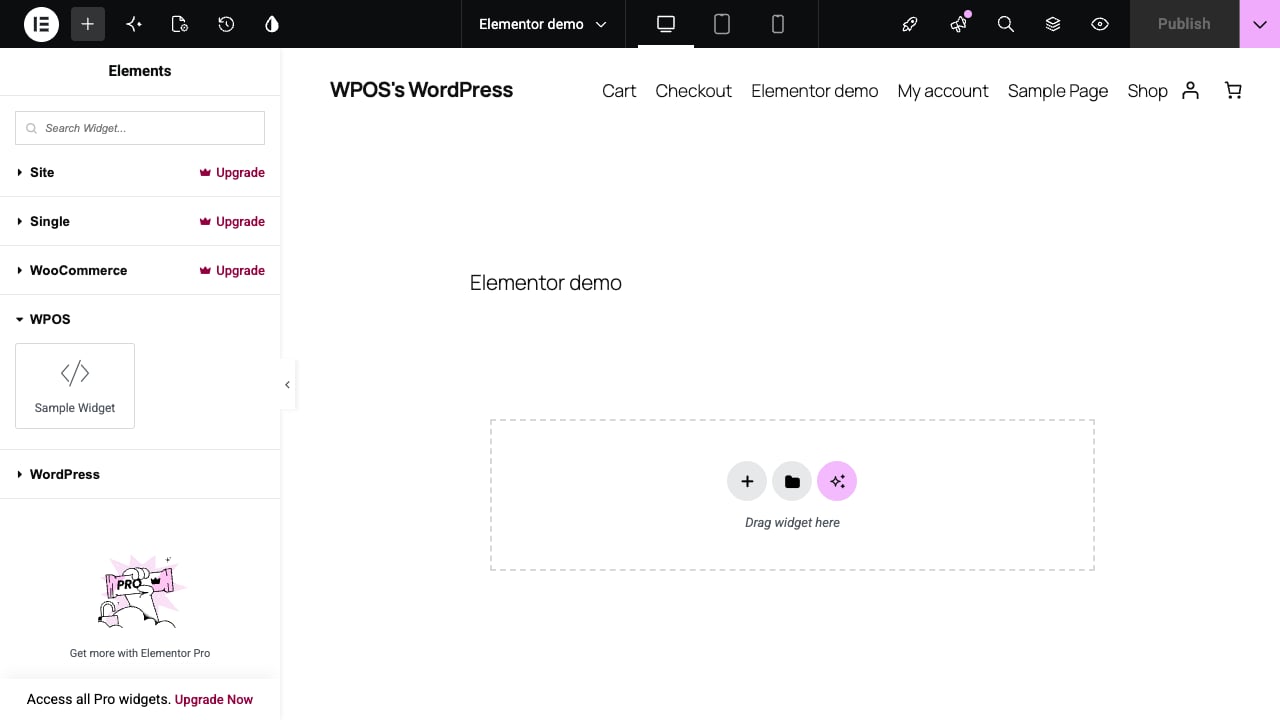
> WPOS builds real Elementor pages you can open and edit in the Elementor editor, and its widgets sit in the Elementor widget panel like any other.
export const YouTubeVideo = ({id, title, caption}) => {
const [playing, setPlaying] = useState(false);
return
{playing ? : }
{caption ?
{caption}
: null}
;
};
On an Elementor site, WPOS builds real Elementor pages: containers and widgets
you can open in the Elementor editor and change the normal way, on your own
theme, with images in your own media library.
## Set the site to Elementor
In [Settings](/operate/settings), under **Preferences**, set **Preferred page
builder** to **Elementor**. The change takes effect from the next chat
session, and WPOS builds in Elementor from then on.
## What WPOS builds
* **Real Elementor pages.** Every section is an Elementor container you can
edit in the Elementor editor afterwards.
* **WPOS widgets in the widget panel.** Every WPOS widget is registered as a
native Elementor widget, under its own **WPOS** category, and renders in the
editor with no compatibility warning.
* **A safety copy before each rewrite.** Elementor does not keep a WordPress
revision when a page's layout is saved this way, so WPOS keeps copies of a
page's recent layouts before it rewrites them. An edit that goes wrong can
be rolled back.
## From a reference site to a finished page
In the video, WPOS rebuilds the look of an inspiration site from one link and
a two-word constraint, "no gradients":
* It studies the reference and describes what it sees before building.
* It copies the photos into the media library instead of linking to the
original site.
* It sets up the theme's colors as variables, so recoloring the whole site is
one edit.
* It adds scroll animations on request, finds and fixes a bug in its own
animation code, and checks every animated element on the page before
reporting done.
```text theme={null}
Rebuild the look of this site in Elementor, no gradients:
https://example.com
```
A page whose sections show up empty after a migration usually uses a WPOS
widget that did not come across to the new site. WPOS names the missing
widget in a note visible to anyone signed in with edit rights (in the page
source), so you know what to bring over.
How WPOS works across page builders, with no lock-in.
Open-source tooling for building Elementor sites as code.
 * **A safety copy before each rewrite.** Elementor does not keep a WordPress
revision when a page's layout is saved this way, so WPOS keeps copies of a
page's recent layouts before it rewrites them. An edit that goes wrong can
be rolled back.
## From a reference site to a finished page
In the video, WPOS rebuilds the look of an inspiration site from one link and
a two-word constraint, "no gradients":
* It studies the reference and describes what it sees before building.
* It copies the photos into the media library instead of linking to the
original site.
* It sets up the theme's colors as variables, so recoloring the whole site is
one edit.
* It adds scroll animations on request, finds and fixes a bug in its own
animation code, and checks every animated element on the page before
reporting done.
```text theme={null}
Rebuild the look of this site in Elementor, no gradients:
https://example.com
```
* **A safety copy before each rewrite.** Elementor does not keep a WordPress
revision when a page's layout is saved this way, so WPOS keeps copies of a
page's recent layouts before it rewrites them. An edit that goes wrong can
be rolled back.
## From a reference site to a finished page
In the video, WPOS rebuilds the look of an inspiration site from one link and
a two-word constraint, "no gradients":
* It studies the reference and describes what it sees before building.
* It copies the photos into the media library instead of linking to the
original site.
* It sets up the theme's colors as variables, so recoloring the whole site is
one edit.
* It adds scroll animations on request, finds and fixes a bug in its own
animation code, and checks every animated element on the page before
reporting done.
```text theme={null}
Rebuild the look of this site in Elementor, no gradients:
https://example.com
```