

How connecting works
You connect an account once. Depending on the tool, WPOS uses one of two methods, and it shows you which when you connect:One-click sign-in (OAuth)
For tools like Google Workspace, HubSpot, or Calendly, you are sent to the
tool’s own authorization screen, approve access, and you are returned to WPOS.
You never handle keys yourself.
API key
For tools like Stripe, you paste an API key from that tool into WPOS. The
credential is stored securely as a connected account.
1
Connect an account
From your account, choose the tool and authorize it with one of the methods
above. This is a one-time setup per tool.
2
Ask the agent to use it
In the Command Center, ask for what you want, for
example “add a JotForm contact form to this page” or “create a Stripe payment
link for this product.”
The Connectors surface
You manage connections from the Connectors surface in the Command Center. It lists the available tools with their connection state, so you can connect, set up, or disconnect each one, and search or filter the catalog by category.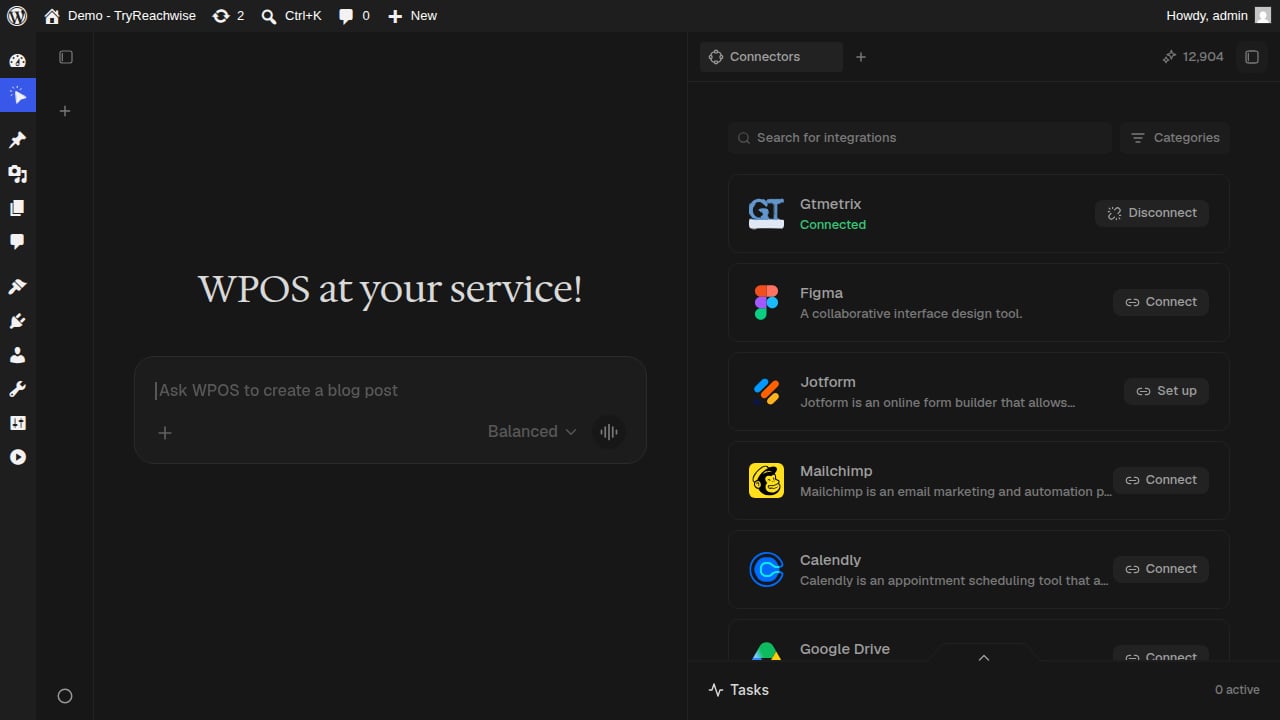
The Connectors surface: each tool shows its state, connected, or ready to connect or set up.
- Connected tools are ready for the agent to use, and can be disconnected.
- Connect starts a one-click sign-in for tools that use OAuth.
- Set up collects an API key for tools that authenticate that way.
The connector catalog
These are the connectors available today, each with how many actions it exposes. The counts are approximate and grow over time. Click any one for its full page.These are the connectors verified working end to end, and the set you will see
in the Connectors surface. The underlying Composio catalog is much larger and
more are being verified. If a tool you need is not here, ask at
support@wpos.ai.