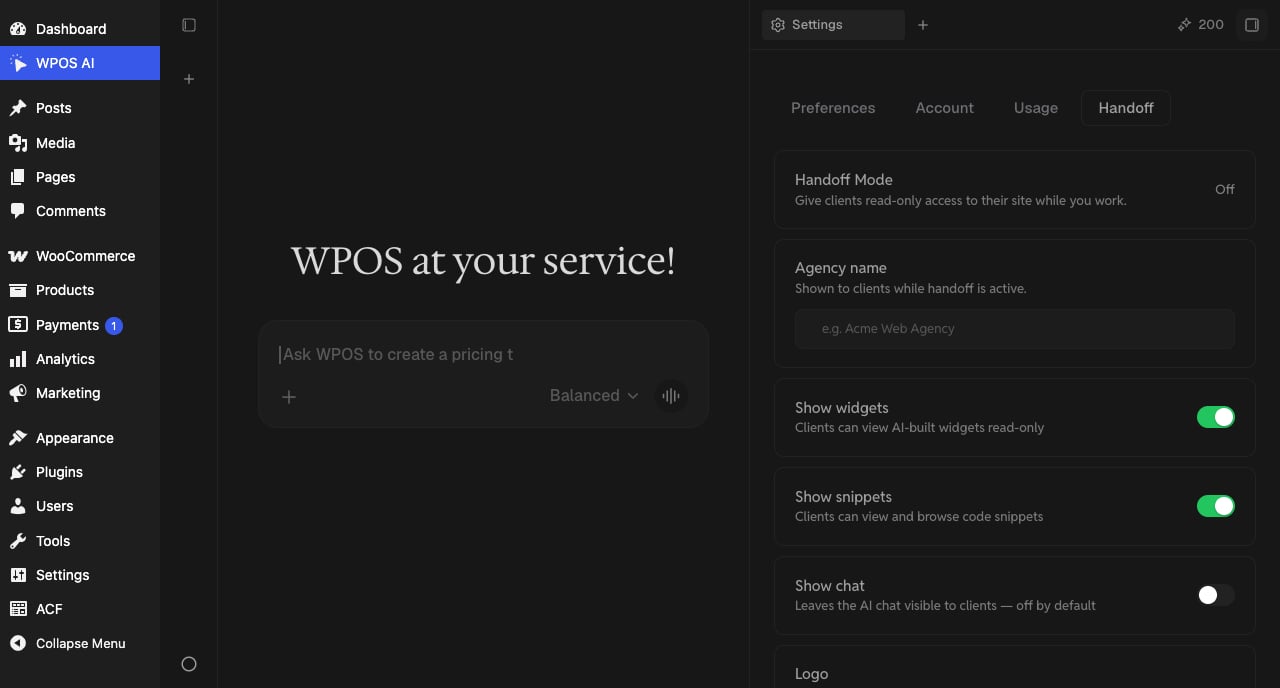
Handoff mode is how an agency delivers a site without handing over the keys to the AI. With handoff on, clients working in wp-admin see your agency’s name and logo instead of an open Command Center, while you keep full access and keep operating the site. Configure it per site in Settings, on the Handoff tab.
The WPOS Handoff settings tab with the handoff mode toggle, agency name field, and show widgets, snippets, and chat controls.

The Handoff tab: agency branding plus per-surface visibility controls for clients.

What you control

  • Handoff Mode. The master switch. Off while you build; on when the client takes the site day to day.
  • Agency name and logo. Shown to clients while handoff is active, so the delivered site carries your brand, not WPOS’s.
  • Show widgets. Clients can view the AI-built widgets read-only. On by default.
  • Show snippets. Clients can view and browse code snippets. On by default.
  • Show chat. Leaves the AI chat visible to clients. Off by default: most agencies keep the agent to themselves and sell the outcomes.
  • Password. The handoff password is what unlocks the full Command Center on that site. Keep it with the team; a client with the password has full access.

How you keep working

Handoff locks the surface, not you. Unlock the Command Center on the site with the handoff password when there is work to do, and lock it again when you are done. You can also switch handoff on or off per site remotely from the Workspace at app.wpos.ai, with no password entry at the site.
Turn handoff on as part of your delivery checklist, in the same pass where you review billing for the site. Delivered sites should never show an open chat to a curious client.