

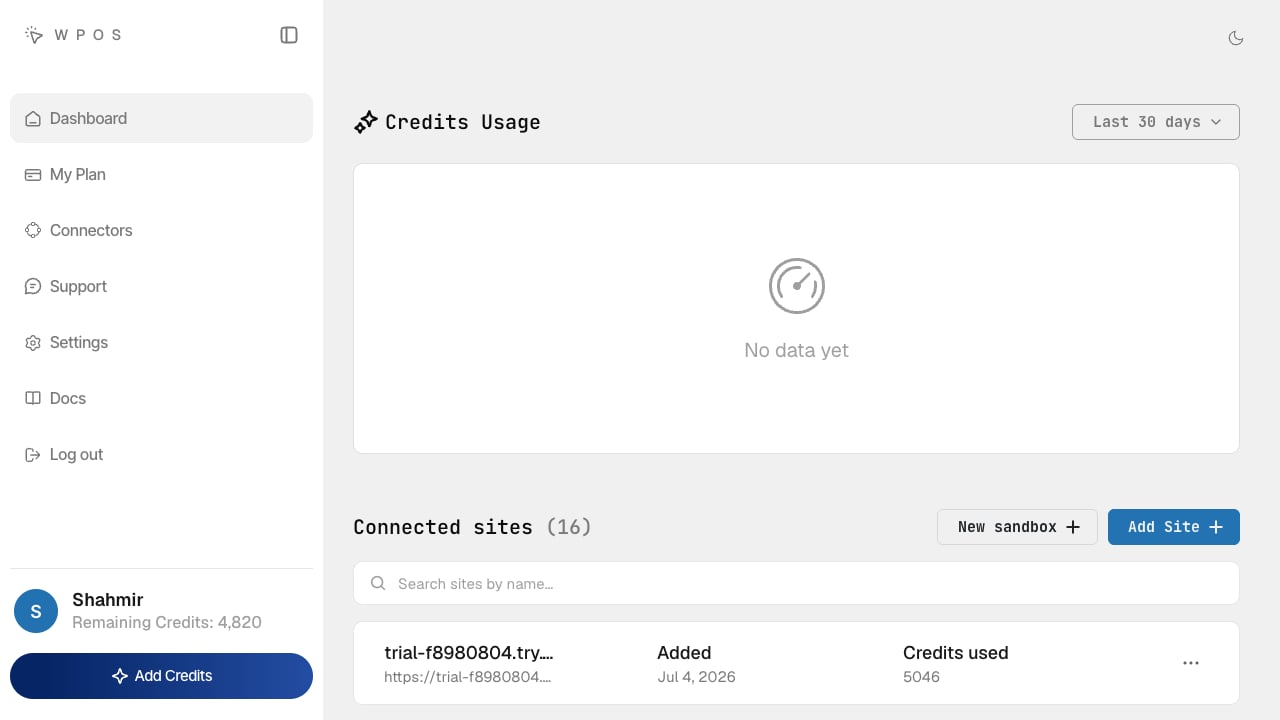
The Workspace at app.wpos.ai: credits usage and every connected site in one view.
Keep the two straight. The Workspace (app.wpos.ai) is the account and site-list
layer. The Command Center is the per-site build
surface inside each site’s wp-admin. The building happens in the Command Center.
The dashboard
- Credits Usage. A running chart of how credits are spent across your account, with a period selector (last 7 days, last 30 days, all time).
- Connected sites. Every site on your account in one list, each with when it was added and how many credits it has used. Search filters the list once you run more than a handful.
- Add Site. Connect another site: download the plugin and paste your license key. See Install.
- New sandbox. Create a WordPress site to test, prototype, or demo on, with no hosting to set up. See Sandboxes.
Move a site to a new install
Every site, and every sandbox, has a Migration key that moves it onto another WordPress install, with its pages, media, chats, and connectors. The site you copy from is left as it is. See Migration key.Your account
The left nav carries the rest of the account:- My Plan and credits. See Billing.
- Members, your team: agency managers and operators, their roles, and their credit budgets. See Members.
- Connectors, the account-wide integrations shared across every site.
- Settings, your profile, password, and your license key (the key you paste when connecting a new site).
Built for fleets
Agencies run many sites, not one. The Workspace is built for that: connect each client site once (see Install), then operate them all from a single account, each site with its own context, and bring your team in to share the work.Members
Bring your team in as agency managers and operators, each with a credit budget.
Invite members
Invite people by email or with a one-time link.
Assign sites
Choose each member’s sites and give them their own WordPress login.
Sandboxes
Create a WordPress site to test, prototype, or demo on.
Billing
Plans, credits, and site licenses.
Client handoff
Deliver a site with WPOS locked behind your agency’s brand.