

Start a new task
1
Click New task
New task sits at the top of the left sidebar. It opens an empty chat
with the WPOS at your service! greeting.
2
Ask for what you want
Type or speak your request and send it. Pick the mode
(Balanced or Expert) in the chat box first if you want a different one. See
Chat and modes.
3
The task gets its name
Your first message creates the task. After WPOS answers, it names the task
from what you asked, for example “Create Dark Mode Bag Sale Landing Page”,
and the task appears in the list.
Your task list
The All tasks section of the sidebar lists your tasks on this site. The task you have open is highlighted.- Reopen a task. Click it. The full conversation comes back and you can keep going from where you stopped.
- Rename a task. Hover over it and click the pencil. Type the new name, press Enter to save or Esc to cancel.
- Delete a task. Hover over it and click the bin, then confirm. This permanently deletes the conversation and all its messages. It cannot be undone.
- See older tasks. Scroll to the bottom of the list and click Load more….
- Make room. The icon at the top of the sidebar collapses it to a narrow strip. New task and the context ring stay available there.
Find a task
To search instead of scrolling, open a new tab in the right panel with + and type in the Find anything on this site box. Matching tasks appear under Tasks (up to eight, matched on the task name). Click one to open it. The same search also finds steps of the task that is running right now.Use earlier tasks as context
You can hand WPOS the history of earlier tasks so it knows what was already decided or built, without pasting anything.1
Drag a task onto the chat box
Drag any task from All tasks and drop it on the chat box. It appears
above your message as a chip with the task’s name.
2
Add up to three
Drag in up to three tasks for one message. Remove one with the x
on its chip.
3
Write your request and send
For example: “Build the About page in the same style as these two.” The
chips stay on your sent message, so you can always see which tasks it
used.
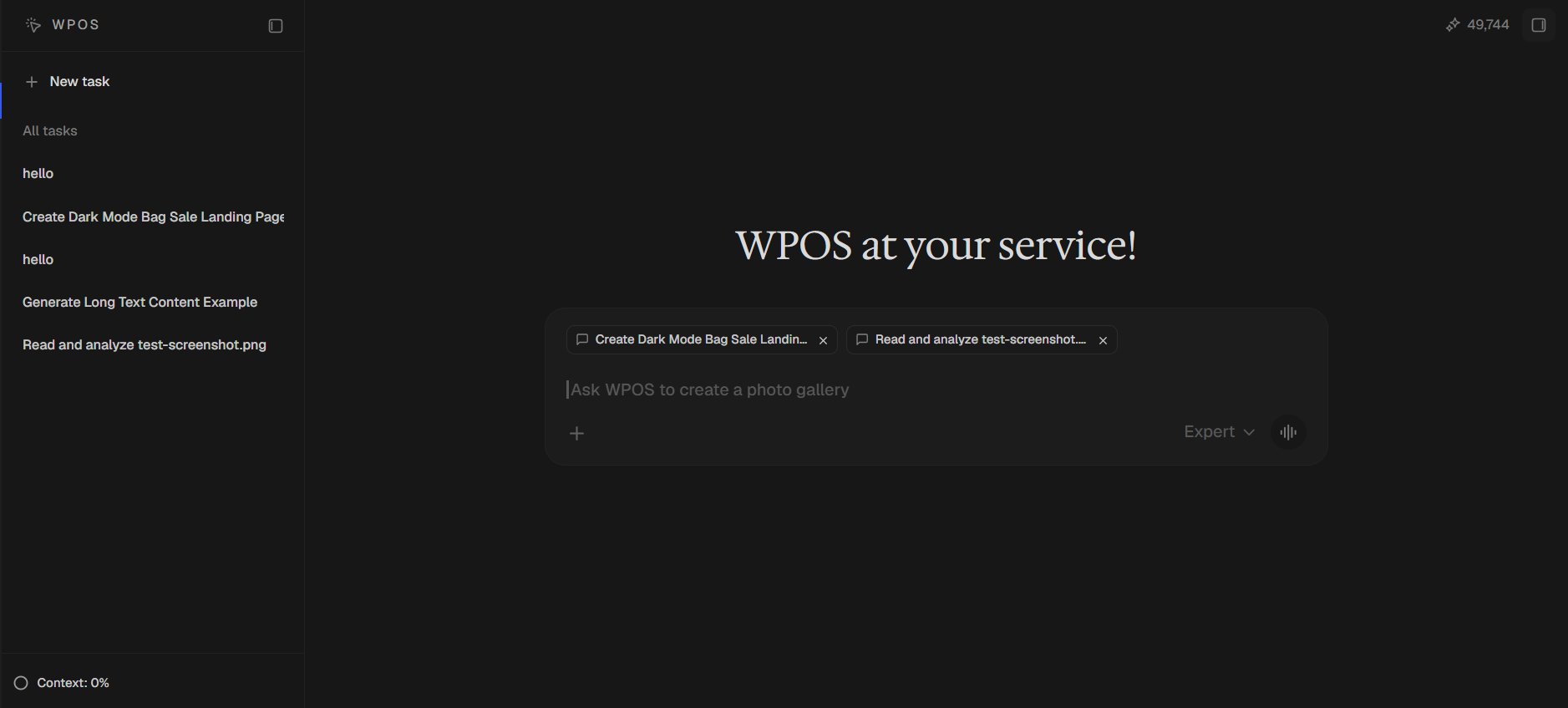
Two earlier tasks dragged from All tasks onto the chat box, each shown as a chip above the message.
- The most recent part of the conversation. Up to the last 60 messages, and roughly 12,000 characters per task. For a long task, that is the latest stretch, which is usually the part that matters.
- A record, not the live site. WPOS treats it as what was said at the time, and checks the site itself before relying on it. If the page has changed since, the live page wins.
- Only your tasks on this site. You cannot reference a task from another site, or the task you are already in (its context is already there).
A referenced task adds to the size of your message, so reference the tasks
that matter for this request rather than all of them.
While a task is running
The Tasks panel
For bigger requests, WPOS plans the work as a list of steps. The plan shows in the Tasks panel just above the chat box, collapsed to a single line such as Tasks · 3 active · 1 running. Click it to expand the list:- The step being worked on sits at the top and is marked running.
- Steps still to come are next.
- Finished steps move to the bottom.
Keep talking, stop, or switch
- Add to the running task. Send a message while WPOS is working and it goes into the run in progress, so you can steer it (“use the brand green instead”) without waiting. Files and referenced tasks cannot join a run already in progress: a message carrying them is held and sent as soon as the run finishes.
- Stop it. Click Stop in the chat box, or press Esc while you are typing in it. The Tasks panel clears for that run.
- Switch to another task. A running task keeps working while you look at something else. Open it again from the list and its progress is there.
- Reload the page. WPOS reconnects to the task that was running and carries on showing its progress.
When a task finishes
A banner above the chat box says whether the task completed or failed, with a short summary. If you let your browser show notifications for this site (WPOS offers to turn them on), you also get a desktop notification, Task completed or Task failed, so you can work in another tab while a long task runs.The context meter
At the bottom of the sidebar, Context: X% shows how much of the task’s context window is used: everything WPOS has read in this task so far, against the most it can hold at once. Next to it is the same figure in tokens, for example48k / 200k.
The ring beside it changes colour as the task fills up:
When a task fills up, WPOS compacts it: you see a Compacting…
notice, then Context compacted, and the task carries on with a summary of
what came before instead of every message. You can also do this yourself, or
clear the context completely, from Settings, Preferences, Context window.
See Settings.